



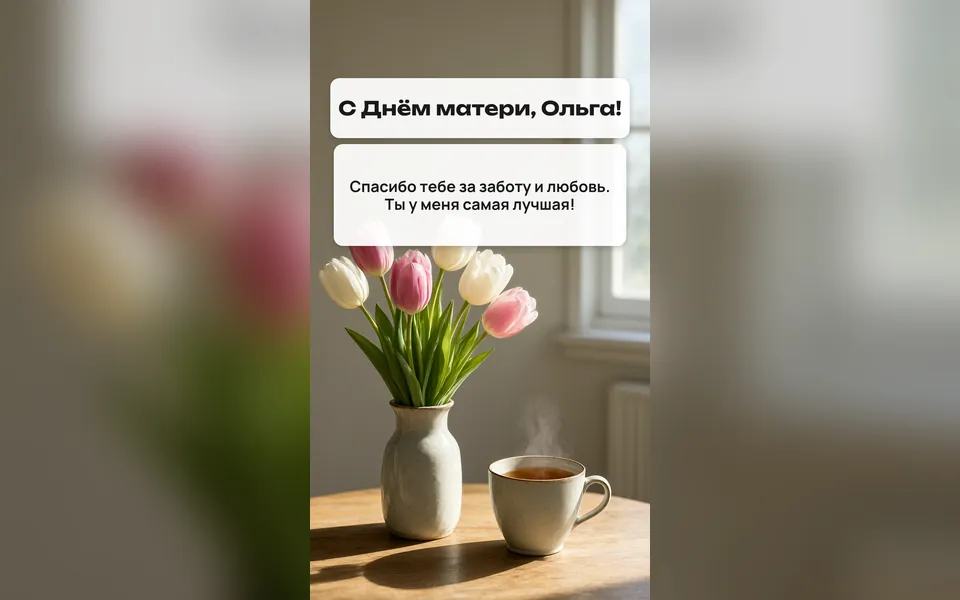



Create a Mother's Day card

Design a custom card with a chosen name, your words, and an optional photo for the holiday.

from 10 coinsCoins come back if it fails

Examples

  • Before
    After

How it works

  1. Choose the recipientPick the intended person from the provided list and enter the name you want to use in the greeting.
  2. Add your message and photoType your personal note in the card text field. Upload your photo if you want to include it.
  3. Receive the final imageYou receive a single image containing your chosen name, message, and optional photo.

How much it costs

from 10 coins

Coins come back if it fails

What it can do

  • Tailored holiday greetingYou combine a specific name, a personal note, and an optional photo to create a unique layout for the season.
  • Flexible input optionsYou choose the recipient from the list, add your message, and decide whether to attach your photo or skip it.
  • Ready-to-share visualYou get a single image file that you can send digitally to your loved ones or keep for the occasion.

A Custom Greeting for the Season

You can create a unique visual card for the holiday. The layout brings together a chosen name, a personal note, and an optional photo. You decide whether to include your picture or keep the design focused on your words. The final image displays your input clearly, making it easy to acknowledge the people who matter most. This approach lets you express your thoughts directly through the card text without relying on stock templates.

Preparing the File for Delivery

You enter the recipient type, type your message, and upload your photo if you wish. The generated image combines all these elements into one file. You download the result and send it through any digital channel. The format works well for direct sharing or saving to your device. You can adjust the details before generating the final file. The interface provides separate fields for the recipient choice, the chosen name, the card text, and your photo.

Questions and answers

Can I add my own photograph to the card?

Yes, you may upload your photo to personalize the layout. The option is available in the input settings.

How do I specify the recipient?

You select the intended person from the provided list. You can choose the specific name to address in the greeting.

Is a photo required to generate the image?

No, the photo remains optional. You can proceed with just the text and the chosen name.

What format does the final output have?

You receive a single image file. The complete card is ready for viewing and sharing.

What happens if the uploaded photo is unclear?

Use a photo of one adult with the face clearly visible. If the face is unclear, the card is refused and you can upload another photo.

Everything is ready to go.

    Necessary cookies keep the site working. With your consent we also use analytics (Yandex Metrica and Umami on our own server) and advertising (VK Ads pixel). You can change your choice any time via "Cookie settings" at the bottom of the site. Learn more